~/plugins/delivery-date

Underpixel Delivery Date

Delivery date picker for WooCommerce. Customers pick a delivery or self-pickup date at checkout, your closed days and preparation time are built in, and you see the date on every order.

Coming soon to WordPress.orgRequires WooCommerceWordPress 6.6+ · PHP 8.0+Free + Pro
yourshop.com/wp-admin
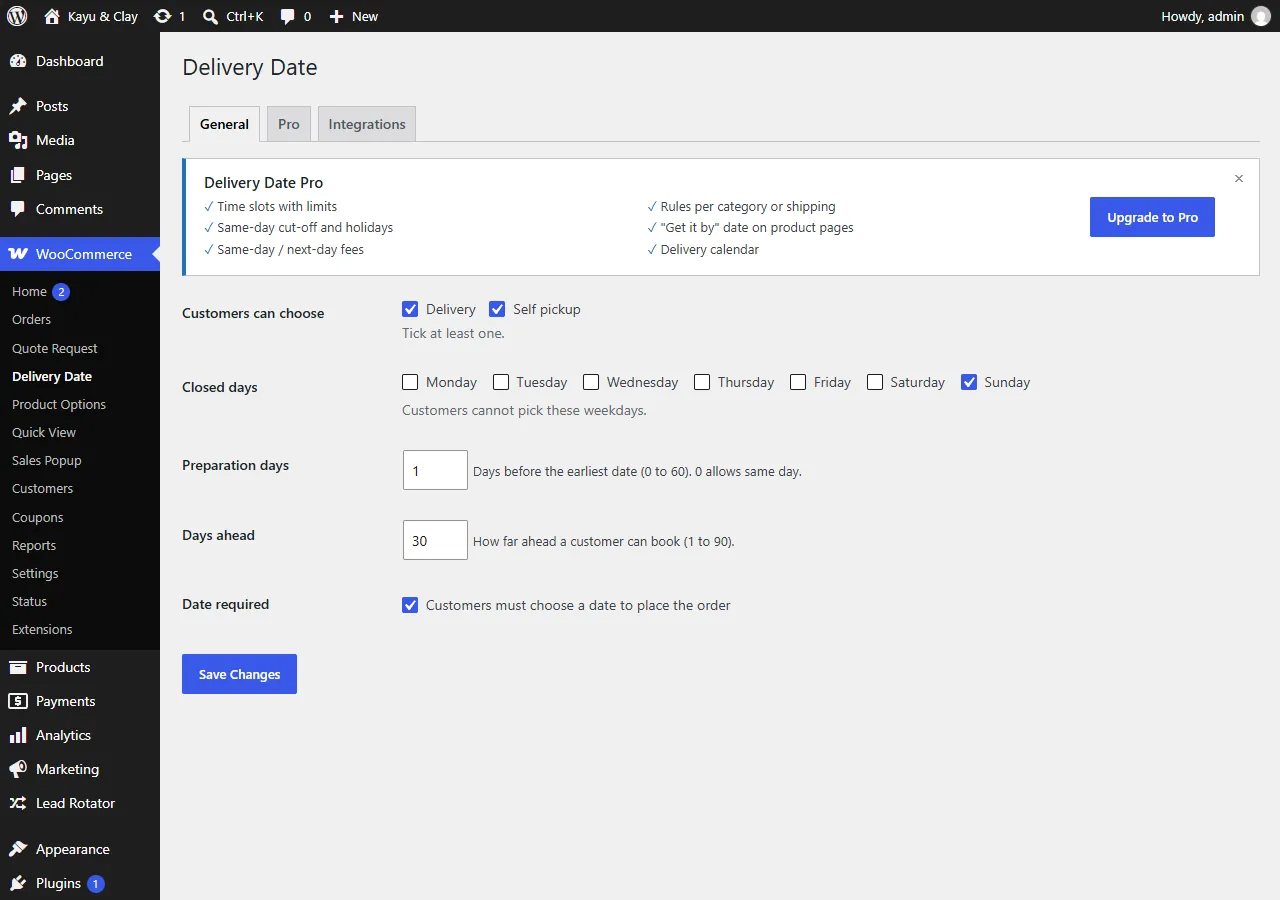
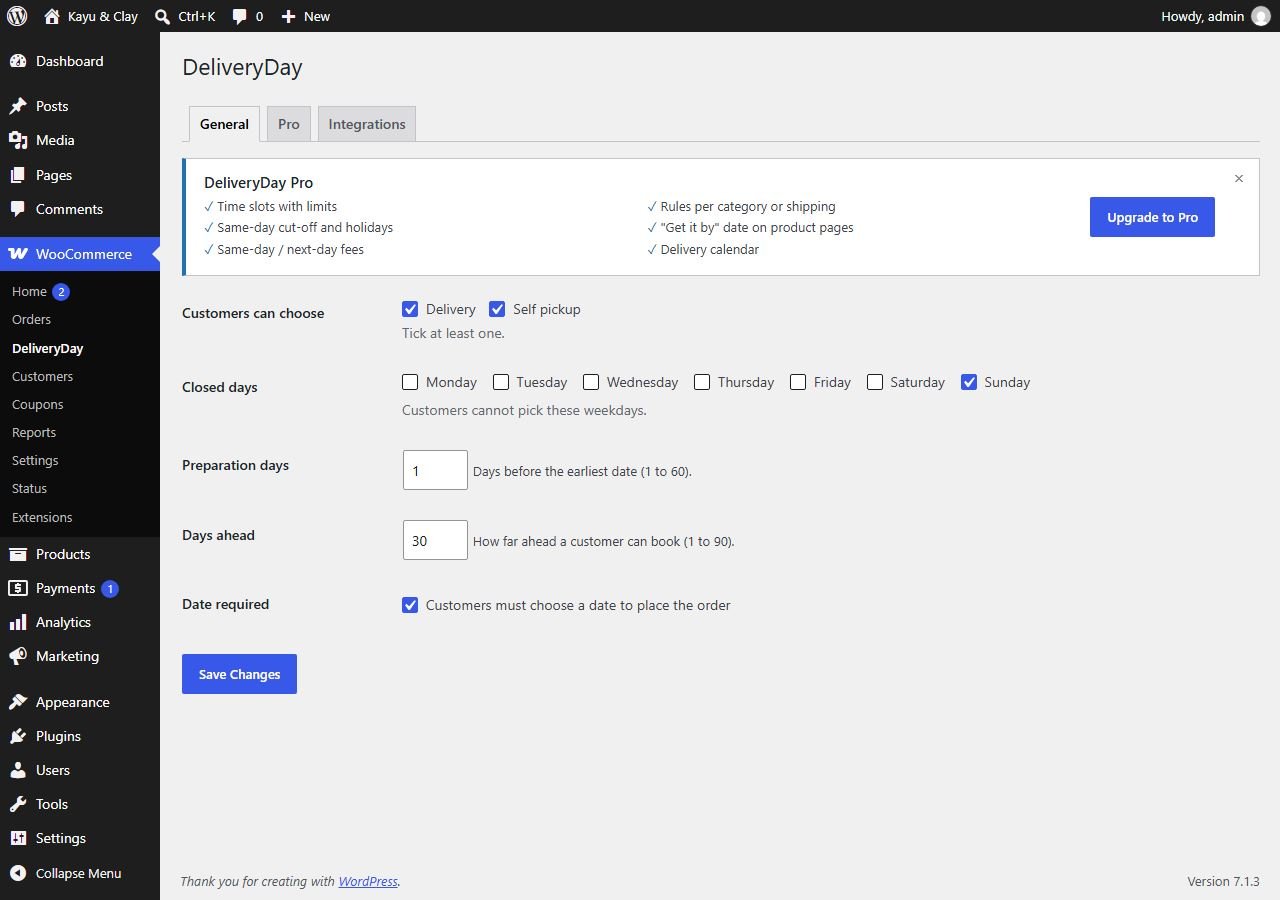
General tab: delivery and/or self pickup, closed days, preparation days
01 / 04General tab
WHAT IT DOES

No more "when can you deliver?" messages

A date picker at checkout

Delivery or self-pickup, on the classic and the Block checkout, in your theme's fonts and colours.

Closed days and prep time

Closed weekdays show "Closed" under the date. Preparation days and how far ahead are up to you.

Checked again on the server

A past, closed, too-soon or too-far date is refused with a clear message, so the order is not placed.

TRY IT · LIVE PREVIEW

Change the settings, watch the checkout update

This is a working copy of Delivery Date's General tab and a sample checkout, using today's date. Nothing is sent anywhere.

Live preview · nothing is sentLIVE DEMO

Delivery Date settings

WooCommerce → Delivery Date → General
Customers can choose
Closed days
Clay vase set
Clay Vase SetQty 1
RM189
Additional order information
Demo only. On a real shop the date is checked again when the order is placed and saved on the order.
FREE VS PRO

Start free, upgrade when you need time slots

Free

Coming soon to WordPress.org
RM0
WordPress 6.6+ · PHP 8.0+
  • Delivery date at checkout (classic and Block)
  • Delivery or self-pickup choice
  • Closed weekdays
  • Preparation days and days ahead
  • Date required or optional
  • Date on the order, emails, thank-you page, My Account and order list
Notify me at launch
PRO

Pro

Everything in Free, plus
RM22/month
or RM169/year · 1 site
  • Time slots (for example 10am–12pm)
  • Daily and slot limits ("Fully booked")
  • Same-day cut-off, holidays and blackout dates
  • Extra fee for same-day or next-day delivery
  • Rules per product category or shipping method
  • "Get it by" date on the product page
  • Delivery calendar for the owner
Notify me at launch
Pro is for 1 site. Prices are approximate in RM; you pay in US$.
SETUP GUIDE

How to set it up.

STEP 1

Install Delivery Date

  1. Make sure WooCommerce is installed and active.
  2. In WordPress, go to Plugins → Add New and search for Delivery Date. Or upload the zip under Plugins → Add New → Upload Plugin.
  3. Click Install Now, then Activate.
  4. Open WooCommerce → Delivery Date. The first time, it asks one question: do you offer delivery, self-pickup, or both, and which days are you closed. Your answer sets up the checkout.
STEP 2

Set your days

Open the General tab.

  • Customers can choose: Delivery, Self pickup, or both. Tick at least one.
  • Closed days: the weekdays customers cannot pick, for example Sunday.
  • Preparation days: days before the earliest date, from 1 to 60.
  • Days ahead: how far ahead a customer can book, from 1 to 90.
  • Date required: when ticked, customers must choose a date to place the order. Untick it to make the date optional.
  • Click Save Changes.
Delivery Date General tab with delivery and pickup, closed days, preparation days, days ahead and date required
WooCommerce → Delivery Date → General
"Today" is your shop's own time zone (Settings → General), never the customer's phone. A shop in Malaysia and a buyer abroad see the same today.
STEP 3

What customers see

Under Additional order information at checkout, the customer chooses Delivery or Self pickup and picks a day in the calendar. Closed days stay visible with "Closed" under the date, so the customer can see why and pick another day. Days inside your preparation time are greyed out.
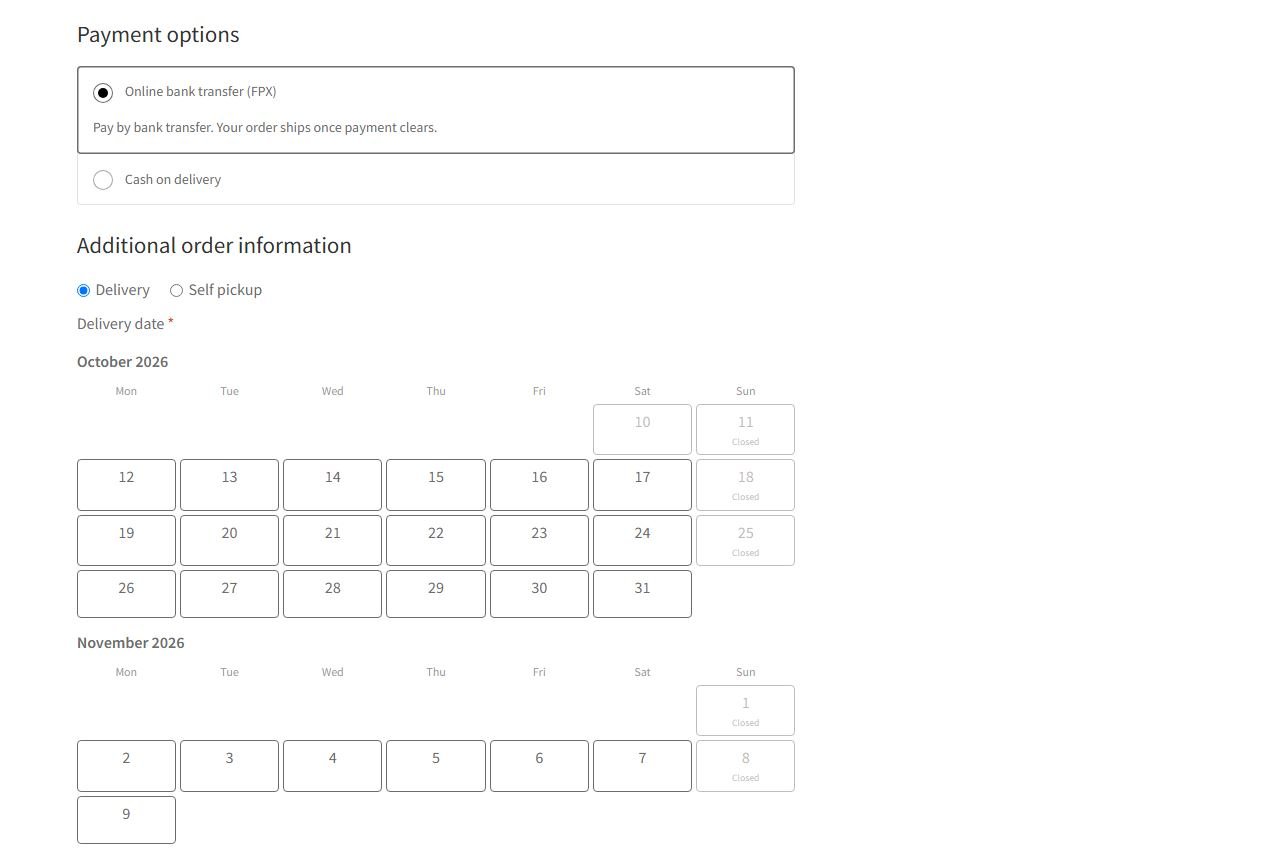
Checkout with Delivery and Self pickup choice and a calendar where Sundays show Closed
Checkout: Sundays closed, 1 preparation day, 30 days ahead
Works on the classic checkout and the Block checkout, and takes your theme's fonts, colours and buttons. Every date is checked again when the order is placed: a wrong date is refused with a clear message.
STEP 4

Dates on your orders

The chosen date appears on the order, in the emails, on the thank-you page, in My Account and in a Delivery column on the Orders list. Orders without a date show a dash.
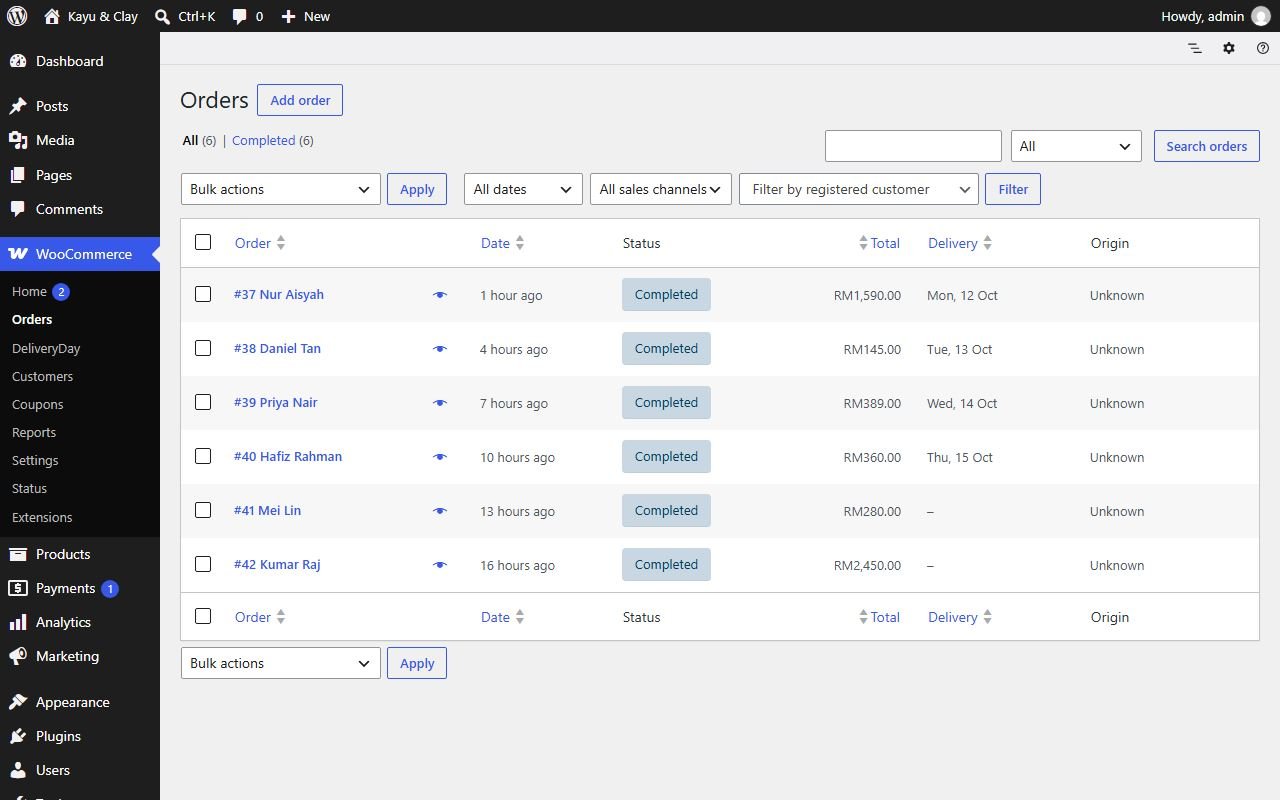
WooCommerce Orders list with a Delivery column showing dates such as Mon, 12 Oct
WooCommerce → Orders, with the Delivery column

Need to move a delivery? Edit the date in the admin order screen. Customers cannot change it themselves in version 1.

STEP 5

Pro features

Pro options are shown greyed out on the Pro tab, so you can see what they do. Pro adds:
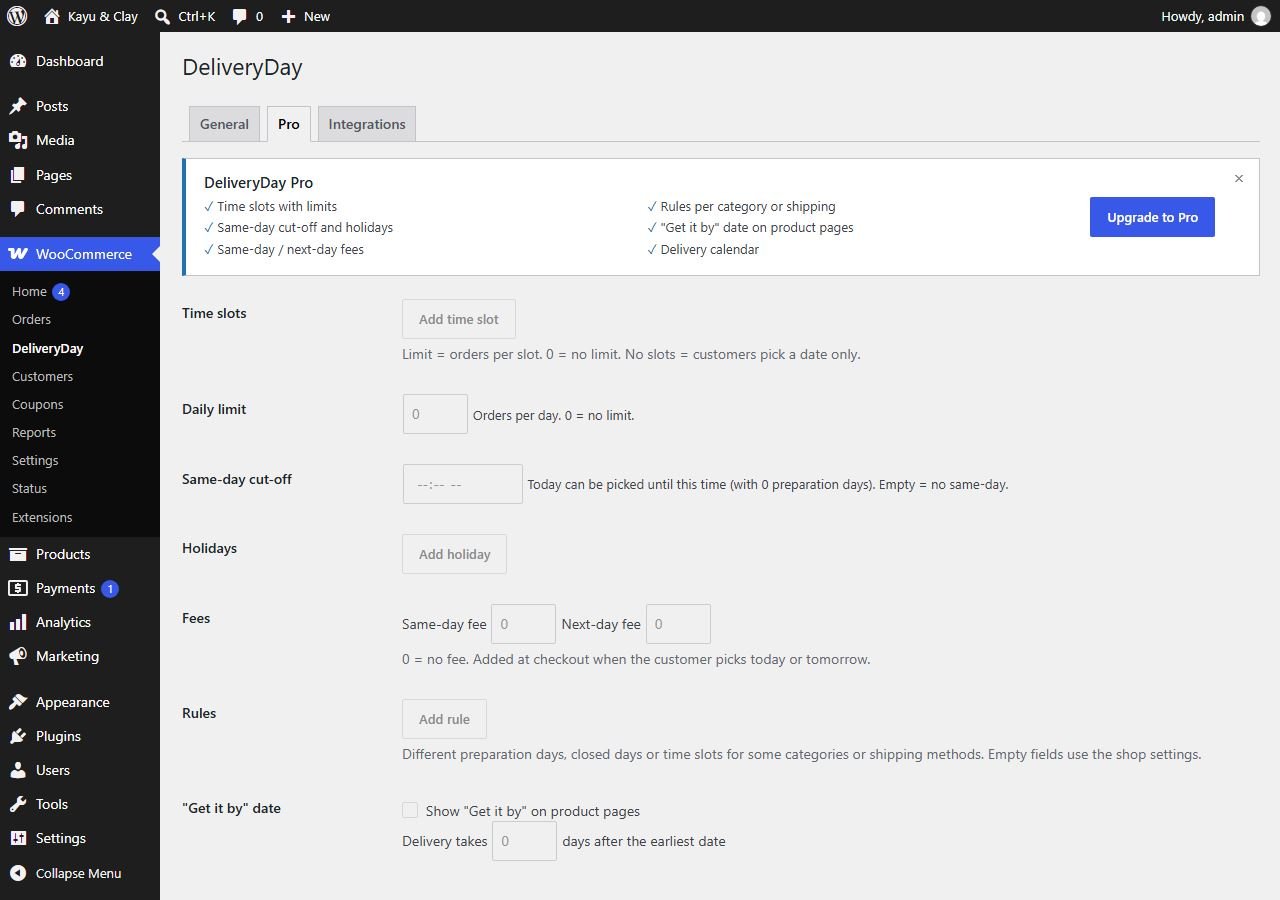
  • Time slots with a limit per slot, and a Daily limit. Full days and slots show as "Fully booked".
  • Same-day cut-off (order before 2pm = today) and Holidays.
  • Fees for same-day or next-day delivery.
  • Rules: different preparation days, closed days or time slots for some categories or shipping methods.
  • A "Get it by" date on product pages, and a delivery calendar for you: orders per day and what to deliver.
Delivery Date Pro tab with time slots, daily limit, same-day cut-off, holidays, fees, rules and Get it by options shown disabled
WooCommerce → Delivery Date → Pro

Pro from about RM22/month or RM169/year

FAQ

Common questions

Yes. The picker works on the classic checkout and on the Block checkout, and the chosen date appears on the order, in the emails and on the thank-you page for both.
Your shop's own time zone (Settings → General), never the customer's phone. Dates are stored as YYYY-MM-DD.
Nothing. An order keeps the date it was placed with, even if you later close that weekday or change the preparation time. New rules apply to new orders only.
No. Orders you create in the admin, through the WooCommerce API, by import, or that a customer pays later from the order link are not checked.
No. The type and date are saved as order data on your own site. It sets no cookies, sends nothing to any other server and stores no IP address. Uninstalling removes the settings but keeps the dates on your orders.
Email underpixel2015@gmail.com with your site address and a screenshot. We reply within one business day.
COMING SOON

Get notified

We'll email you once launches. Nothing else.

underpixel start --project yours

Let’s build yours.

Tell us about your business. You get a clear quote before any work starts.