~/plugins/lead-rotator

Underpixel Lead Rotator

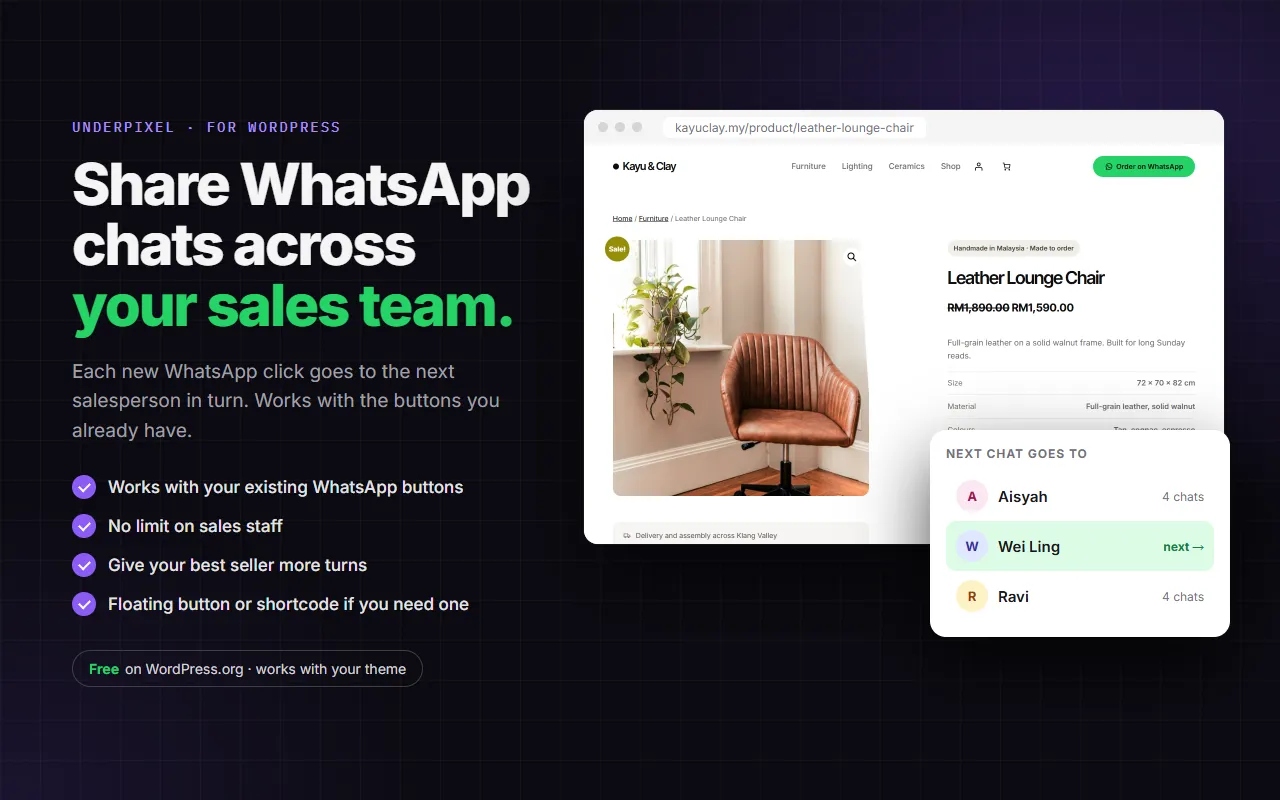
Chat rotator and round robin for sales teams. Each new WhatsApp click goes to the next salesman in your list, so enquiries are shared fairly and nobody has to pass them on by hand. Works with the WhatsApp button you already have.

Free on WordPress.orgWorks with any themeWordPress 6.6+ · PHP 8.0+Free + Pro
wordpress.org/plugins/underpixel-lead-rotator
Share WhatsApp chats across your sales team
01 / 05Overview
WHAT IT DOES

Every salesman gets a fair turn

Chats in turns

Staff 1, then staff 2, then staff 1 again. Nobody gets all the enquiries.

Keeps your button

It finds the WhatsApp links already on your pages and swaps in the next salesman's number at the moment of the click. The message stays the same.

Never a dead button

If anything fails, the visitor still reaches WhatsApp on your original number.

TRY IT · LIVE PREVIEW

Press the button, watch the chats take turns

A working copy of Lead Rotator's staff list and floating button. Switch staff off and on, then send a few sample clicks. Nothing is sent anywhere.

Live preview · nothing is sentLIVE DEMO

Lead Rotator settings

Lead Rotator → Staff

Clicks go to your staff in turns.

Button text
First message
Kayu & ClayShop
Click the button to send a sample enquiry.
?
Waiting for a clickWhatsApp · preview
The chat opens with the next salesman.
CLICKS PER STAFF (DEMO)
Aisyah0
Wei Ling0
Ravi0
All clicks: 0
Demo only, nothing is sent. In the plugin, Free shows click totals; clicks per staff is a Pro report.
FREE VS PRO

Free for your whole team, Pro adds hours and rules

Free

On WordPress.org
RM0
WordPress 6.6+ · PHP 8.0+
  • Sales staff in the rotation Unlimited
  • Works with your existing WhatsApp buttons (theme and plugins)
  • Floating button, left or right, with your own text
  • [leadrotator] shortcode button
  • First message text
  • Click totals: last 30 days and all time
  • Weights: give your best seller more turns
Download free
PRO

Pro

Everything in Free, plus
RM22/month
or RM169/year · 1 site
  • Clicks per staff and per page, CSV download
  • Working hours for each staff
  • Different staff per page or category
  • Same customer, same salesman
Get Pro
Pro is for 1 site. Prices are approximate in RM; you pay in US$.
SETUP GUIDE

How to set it up.

STEP 1

Install Lead Rotator

  1. In WordPress, go to Plugins → Add New and search for Lead Rotator. Or upload the zip under Plugins → Add New → Upload Plugin.
  2. Click Install Now, then Activate. WooCommerce is not needed.
  3. Open Lead Rotator in the admin menu and answer the first question: does your website already have a WhatsApp button?
STEP 2

Add your sales staff

Open the Staff tab.

  • Click Add staff and fill in Name and WhatsApp number with the country code. You can type +60 12-345 6789; the + and spaces are cleaned automatically.
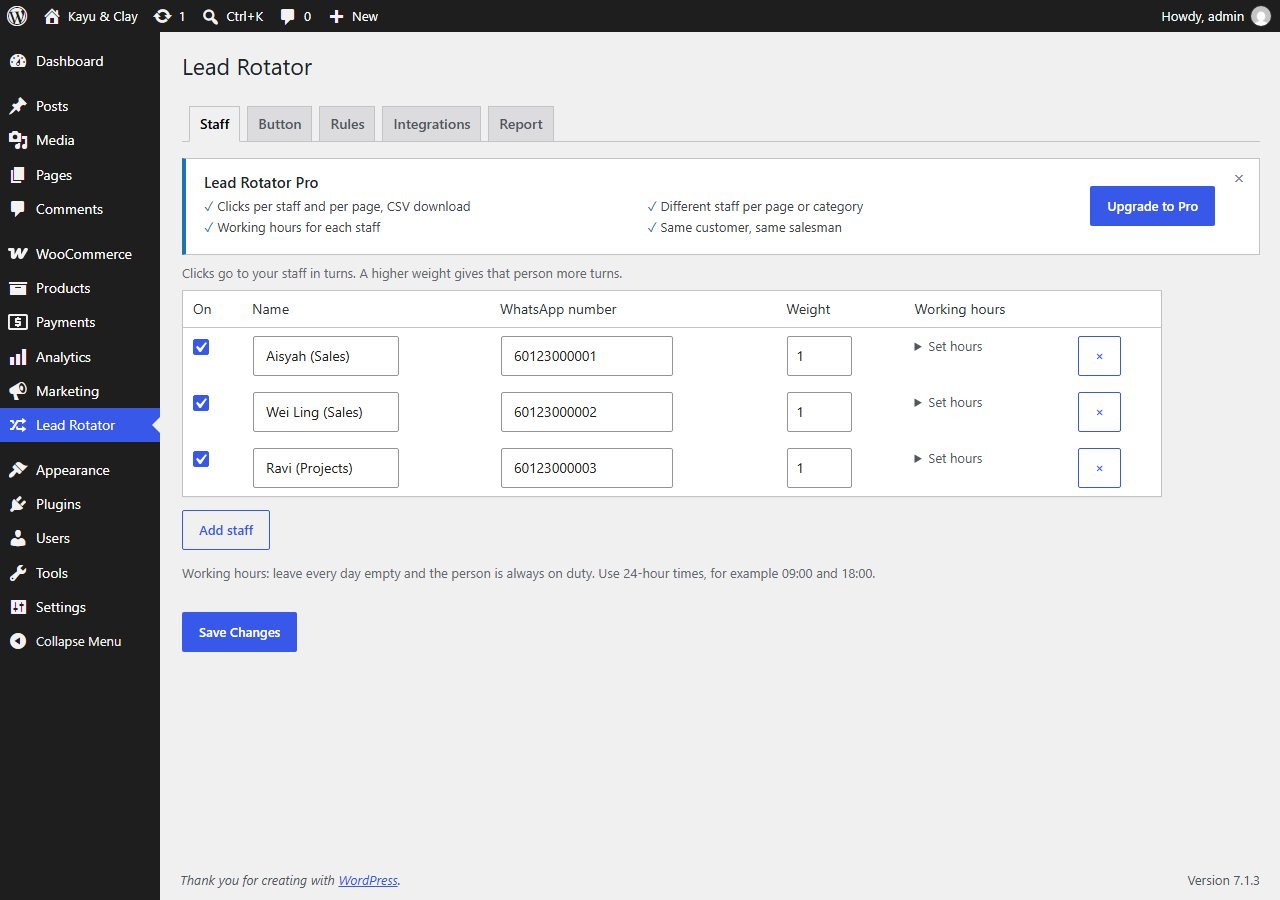
  • Tick On for each person who should receive chats. Every active staff member takes turns.
  • Weight (1 to 5) gives that person more turns. Working hours is shown greyed out; it is a Pro option.
  • Click Save Changes.
Lead Rotator Staff tab with three active staff, each with a weight
Lead Rotator → Staff
STEP 3

Choose the button

Open the Button tab.

  • Other buttons: tick Also rotate WhatsApp buttons from your theme and other plugins to keep the button you already have. Lead Rotator finds wa.me, api.whatsapp.com, web.whatsapp.com and whatsapp:// links.
  • Floating button: no WhatsApp button yet? Tick Show a floating WhatsApp button on every page and pick a Position, bottom left or bottom right.
  • Button text and First message: the button label, and the text the customer sees already typed in WhatsApp.
  • Shortcode: put [leadrotator] or [leadrotator text="Chat now"] in any page or post. Nothing shows until you add at least one active staff.
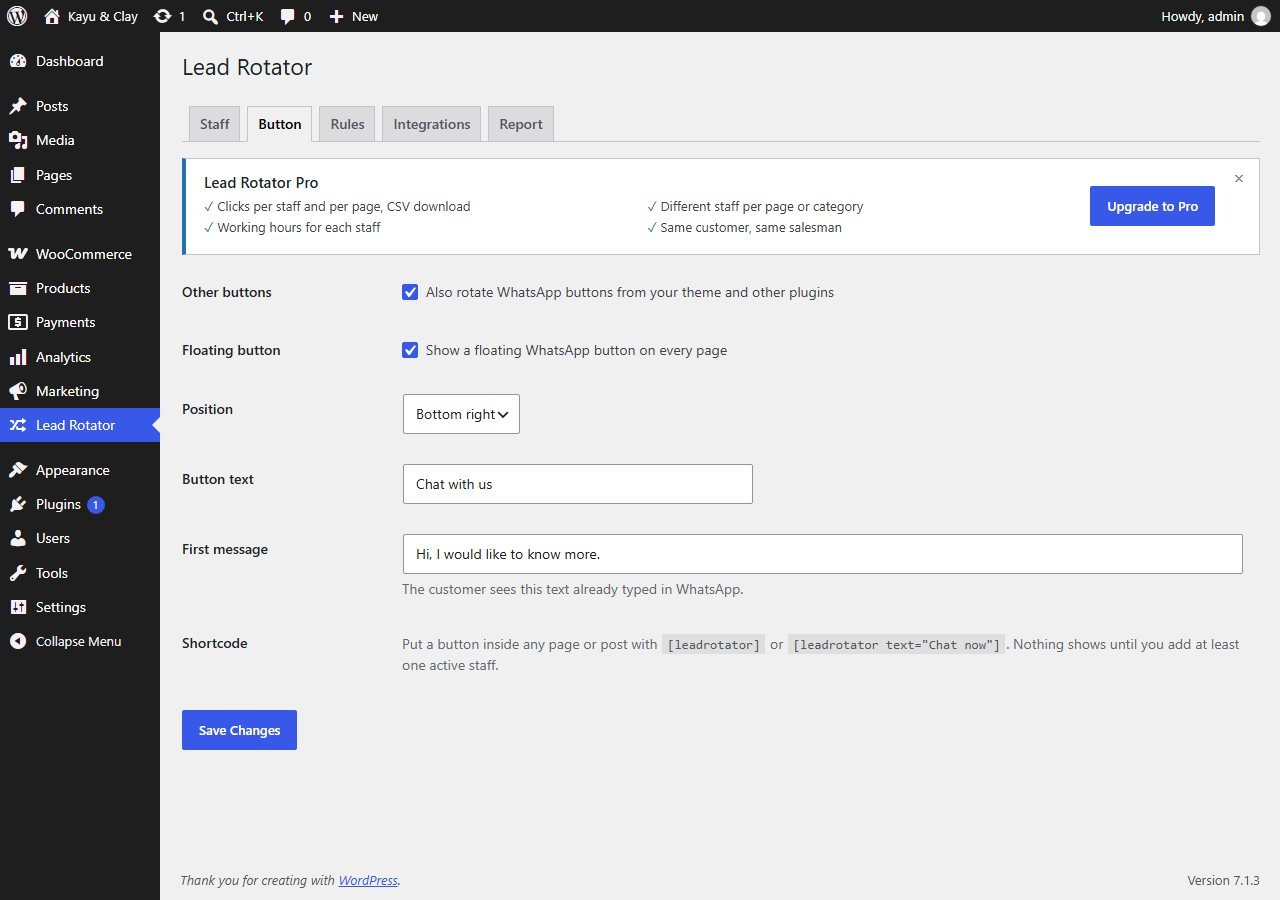
Lead Rotator Button tab with other buttons, floating button, position, button text, first message and shortcode
Lead Rotator → Button
STEP 4

What visitors see

Visitors see your normal WhatsApp button, or the floating Chat with us button. When they press it, WhatsApp opens with the next salesman's number. The floating button and shortcode use your theme's own button style.
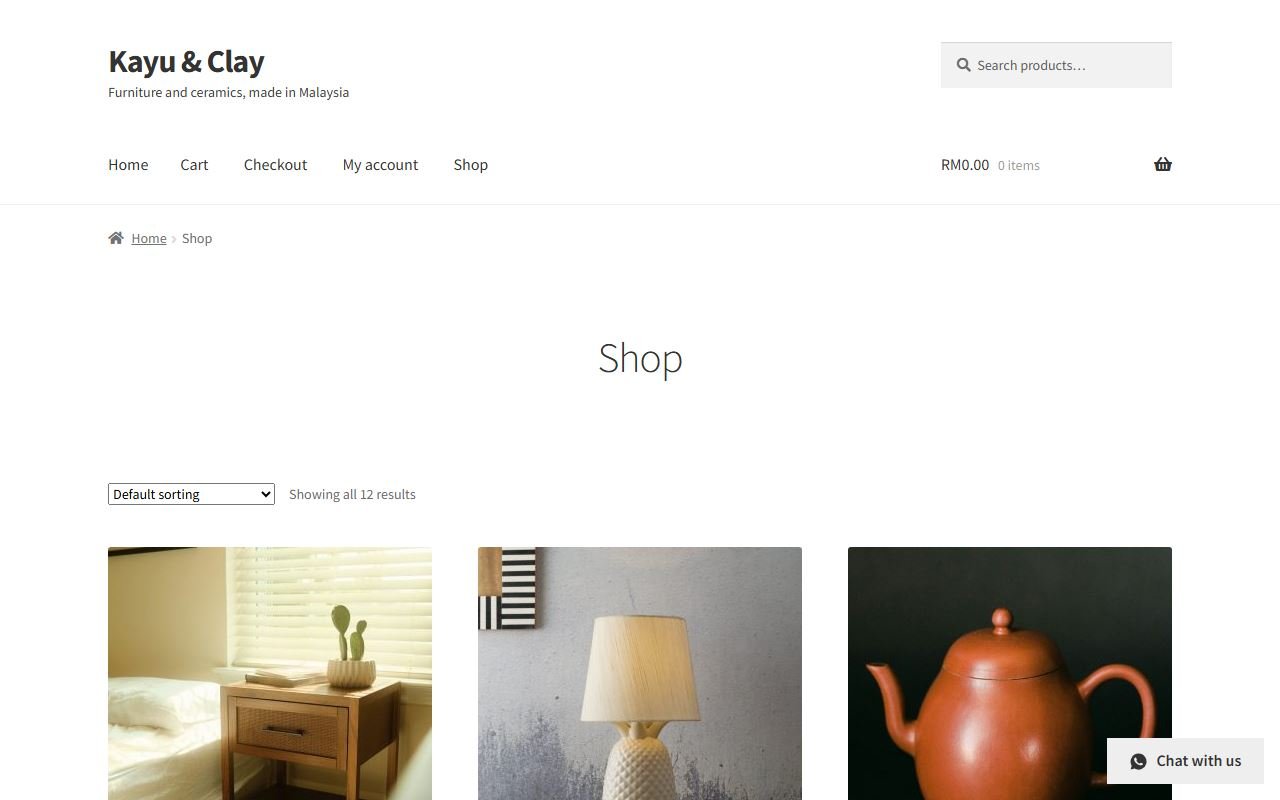
Shop page with a floating Chat with us button in the bottom right corner
Shop page with the floating button (Storefront theme)
The turn is decided at the moment of the click, not when the page is built, so you do not need to exclude pages from your caching plugin.
STEP 5

Check the click report

The Report tab shows Clicks in the last 30 days and All clicks. A click means a visitor pressed a WhatsApp button; Lead Rotator cannot see whether they then sent a message.
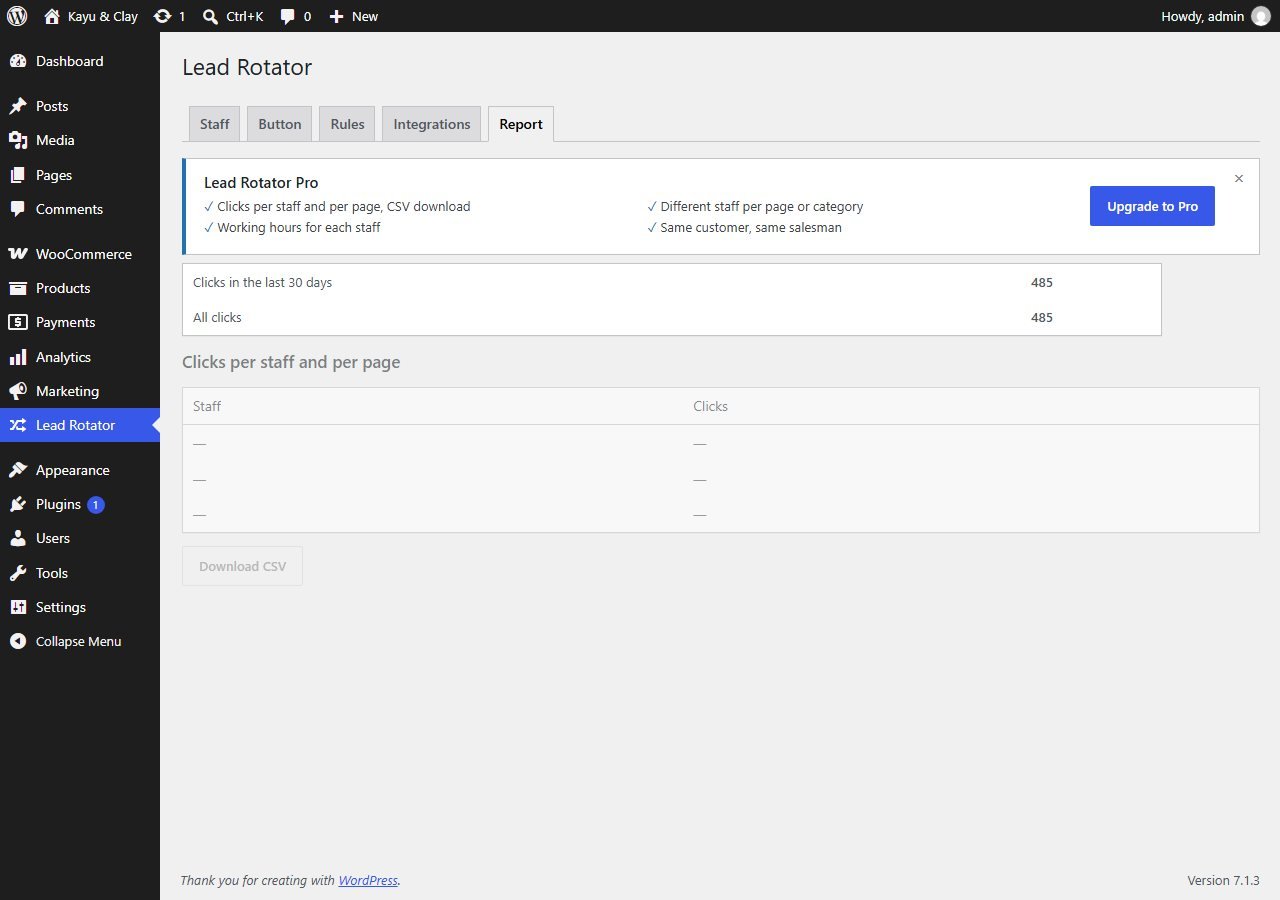
Lead Rotator Report tab with click totals and a greyed out clicks per staff table
Lead Rotator → Report

Clicks per staff and per page and Download CSV are Pro.

STEP 6

Pro features

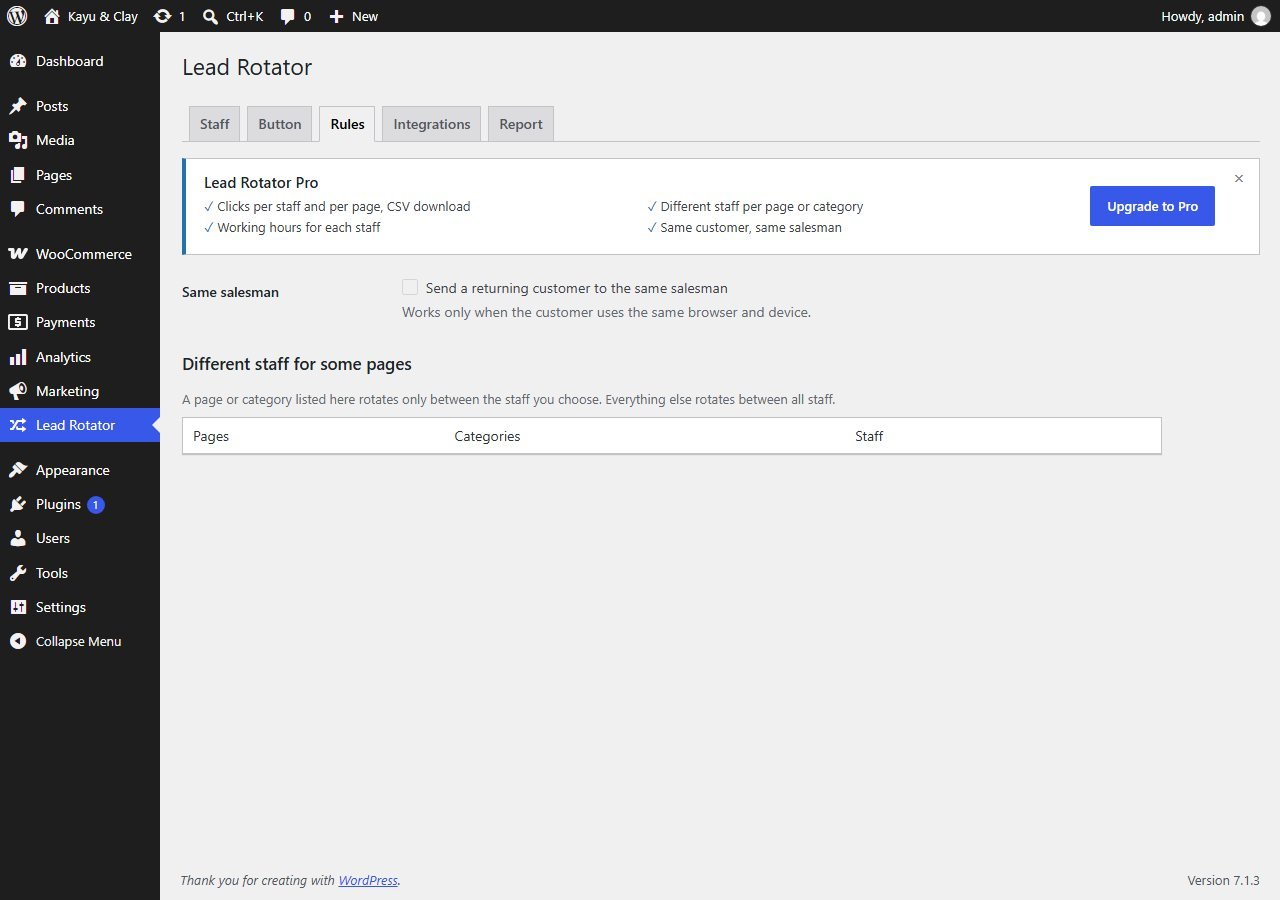
Pro options are shown as a banner and as disabled options, so you can see what they do. Nothing in the free plugin is locked or time-limited. Pro adds:
  • Clicks per staff and per page, with CSV download.
  • Working hours for each staff.
  • Different staff for some pages: a page or category rotates only between the staff you choose.
  • Same salesman: send a returning customer to the same salesman (same browser and device only).
Lead Rotator Rules tab with same salesman and different staff for some pages shown disabled
Lead Rotator → Rules

Pro from about RM22/month or RM169/yearGet Pro

FAQ

Common questions

Buttons that are WhatsApp links, or that open a WhatsApp link when pressed, are rotated. It has been checked with Joinchat, Click to Chat, WP WhatsApp (NinjaTeam), WhatsApp Chat (QuadLayers), Chaty, Elementor buttons and Quote Request.
The visitor always reaches WhatsApp. If the script cannot run, the original link works. If no usable salesman is found, the visitor goes to the original number.
Clicks, not chats. A click means a visitor pressed a WhatsApp button. Lead Rotator cannot see whether the visitor then sent a message.
No. No IP address, no user agent, no phone number. It saves your settings, a click counter per day, staff and page, and a ticket counter that decides whose turn it is. The Pro option "Same customer, same salesman" sets one cookie that holds only a staff id.
Purge your page cache. A saved copy of a page can still hold the rotation link. Lead Rotator clears the common cache plugins when you deactivate it, but check yours.
No. It works on any WordPress site. On a WooCommerce shop, our free Quote Request plugin adds a WhatsApp button to product pages, and Lead Rotator shares those clicks between your staff.
Network activation is not supported in this version. Activate it on each site separately.
Email underpixel2015@gmail.com with your site address and a screenshot. We reply within one business day.
underpixel start --project yours

Let’s build yours.

Tell us about your business. You get a clear quote before any work starts.